Introducing the AI terminal
Dagon SSH started as an SSH client with voice input. As of version 2.2.16 it is something else: an AI terminal. There is now an agent sitting on top of your live SSH session that can look at what the terminal prints, propose the next command, and continue the job with you, step by step, from your phone.
This post explains what shipped, how the loop works, and the one rule the whole thing is built around: nothing runs without your tap.
The problem
You are on the phone. A deploy went wrong, nginx will not start, and the error is right there on the screen. You know roughly what to do, but the loop of "read the error, think, type a long command on a glass keyboard, read the next error" is exactly the loop a phone is worst at.
A chatbot in a separate tab does not help much either. You end up copying terminal output into it, pasting commands back, and losing context every time. The model never actually sees the terminal.
So the agent lives inside the terminal screen.
Chat: the agent mode
Tap the AI button in the toolbar, switch to Chat, and say what you want. Speak it or type it.
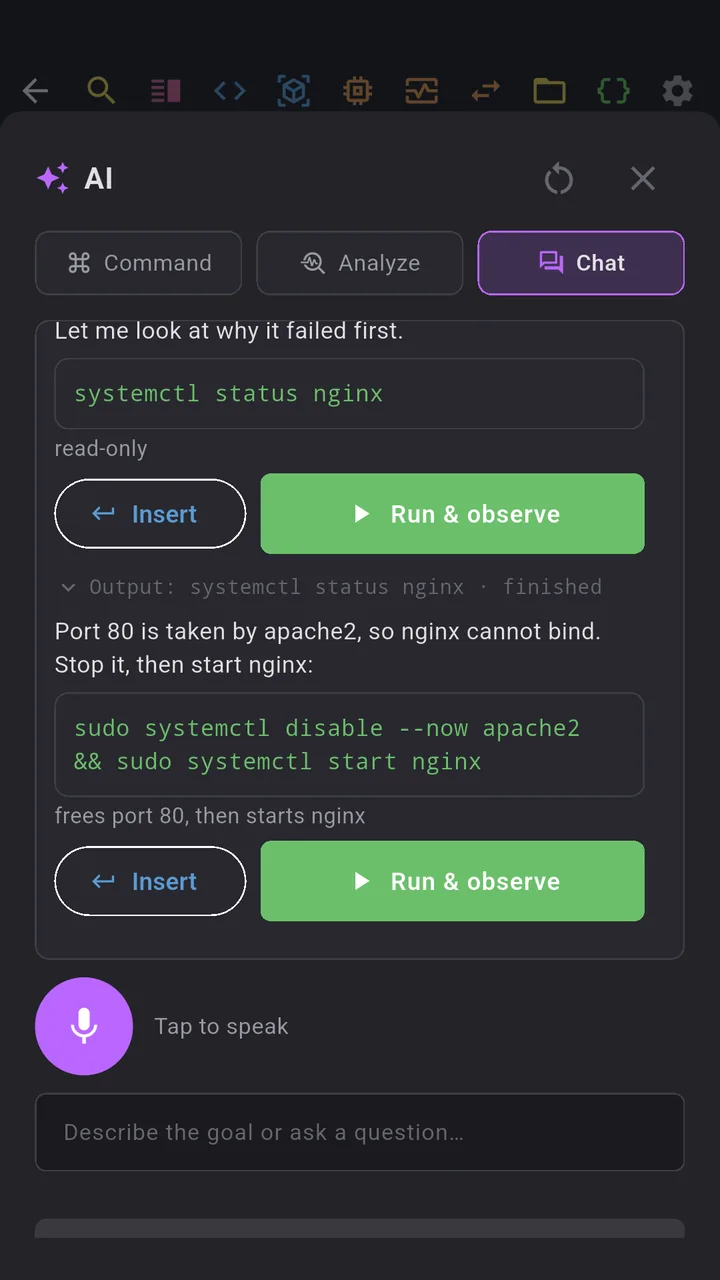
The AI answers with a short explanation and up to three commands. Every command has two buttons: Insert just types it into the terminal for you to edit, and Run & observe types it, presses Enter, and starts watching.
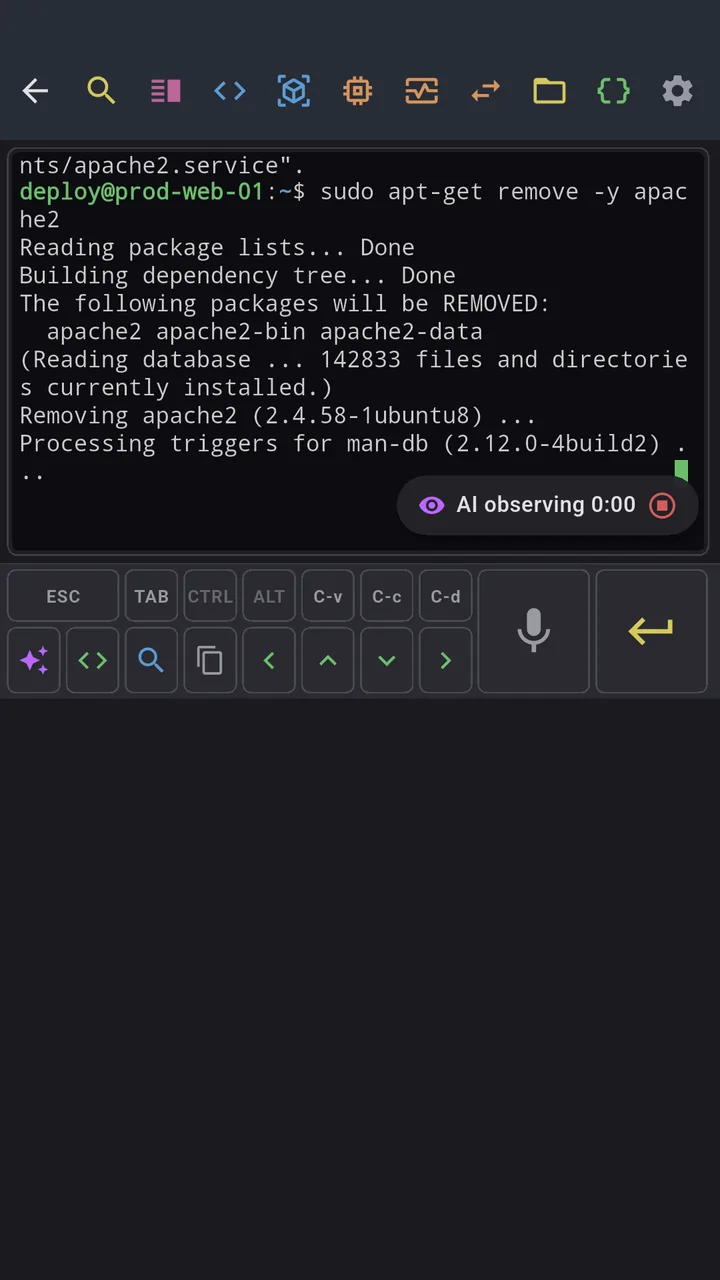
While it watches, the sheet closes so you can see the terminal. A small chip above the toolbar shows "AI observing 0:12". When the shell prompt comes back, the app collects everything the command printed, masks anything that looks like a secret, and hands it to the AI as the next message in the conversation. The AI reads it and proposes the next step. You tap again. And so on, until it says the goal is reached.
That is the whole trick: a normal conversation, except one side of it can see and (with your permission) act on a real server.
Long jobs and periodic checks
Most commands finish in a second. Builds, migrations and apt runs do not, and a naive "wait for the prompt" would leave the AI blind for minutes.
So the observation has three signals:
1. The prompt is back. Two seconds of silence and the shell prompt on the last line means the step finished. The output goes to the AI immediately. 2. Silence without a prompt. An interactive question, a process that prints nothing. The app keeps waiting and does not call the AI. Silence is free. 3. Periodic checkpoints. While the command keeps printing, the app sends the new output at 10 s, 30 s, 60 s and then every minute. The AI can react mid-run: "the build is failing on module X, you can interrupt", with a Ctrl+C button next to it. At most eight checkpoints per command, and you always have Send now and Stop.
Long conversations do not run out of context either. When the thread grows past a budget, the older part is folded into a short working summary on the server (goal, what was tried, what is known, current state) and the conversation continues from there.
Analyze and Command
Chat is the headline, but the other two modes are the ones you will probably use most often.
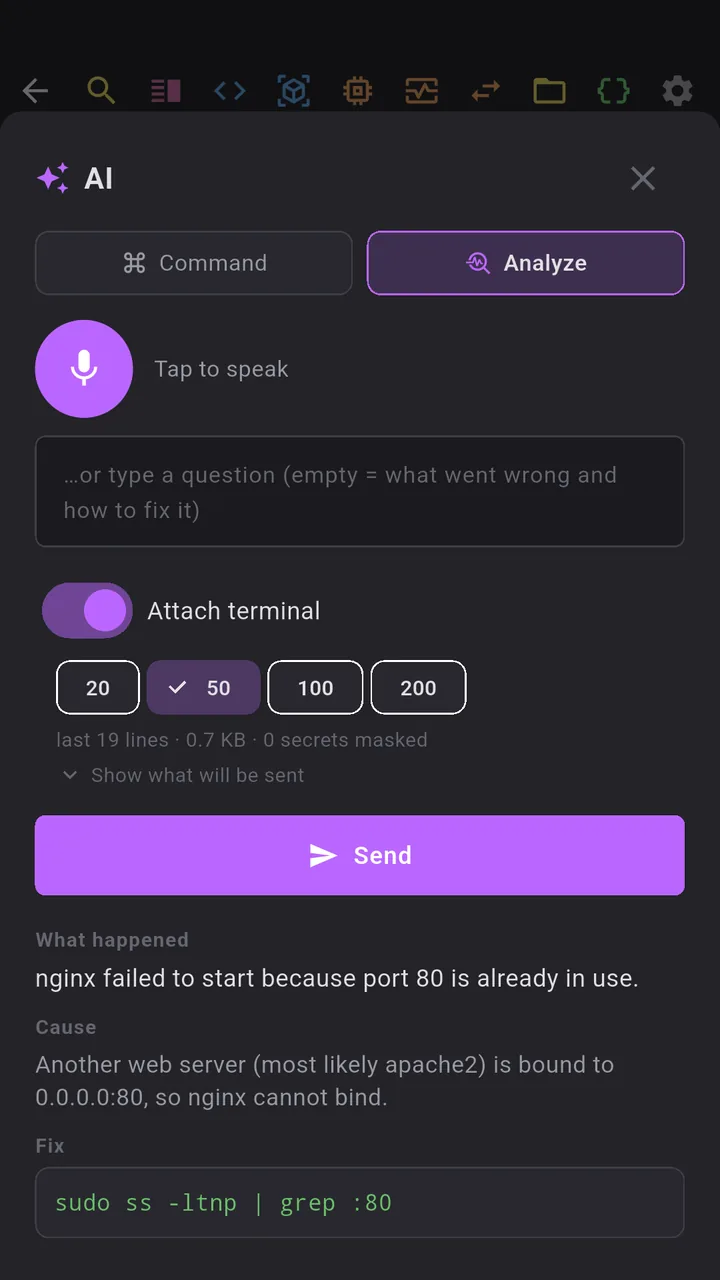
Analyze is for "what just happened". One tap sends the last 20 to 200 lines of the terminal (your choice) and you get back what went wrong, why, and up to three fixes with Insert and Run buttons.
Command is the original voice feature, now in the same sheet: press the mic, say "find what eats the disk, biggest directories first", get sudo du -xh / --max-depth=2 | sort -rh | head -20. Fifteen languages, auto-stop on silence, say "enter" to run.
What it will never do
I run this against my own production boxes, so the rules are strict and they are not configurable:
- The AI never types anything by itself. Every command is typed only when you tap it. There is no "auto-approve" mode and there will not be one.
- Risky commands get no button. Anything matching destructive patterns (
rm -rf /,mkfs,ddto a device,curl | shand friends) is shown with a warning and no Insert or Run. If you really want it, you type it yourself. - Terminal text leaves the phone only when you say so. The "Attach terminal" switch is off by default. In Chat mode, only the output of commands you ran through the agent is sent, plus the current screen with the first message if you attached it.
- Secrets are masked on the device before anything is sent: passwords, tokens, API keys, private keys, JWTs. The sheet shows you the exact text that will go out, and how many secrets it masked.
- Nothing is stored on our servers. The conversation lives on your phone and is sent whole with each turn. The backend processes it in transit and keeps no copy.
Where it runs
The model behind the agent is Qwen 3.6, self-hosted, with OpenAI as a fallback when the home box is busy. Transcription is Whisper, also self-hosted. You do not configure any of this and you do not bring API keys. The AI features count against a daily limit that is generous for real work and exists mostly so nobody can run a bill up on my GPU.
Try it
Dagon SSH 2.2.16 is in open beta on Google Play. The AI terminal is a Premium feature; every new account gets 60 days of Premium free, no card required. If you hit something the agent handled badly, or a case where the prompt detection got confused by an exotic shell theme, tell me: <a href="mailto:contact@alpaco.it">contact@alpaco.it</a>. The prompt heuristics and the checkpoint timings are the parts I expect to tune most from real-world feedback.
The plan from here is a server profile in the agent's context (OS, packages, services), so it stops asking things it could have checked, and multi-step plans it can lay out before you start tapping.