ConnectBot alternative for Android in 2026
connectbotmigrationssh-clientandroid
ConnectBot is a small masterpiece. Open source since 2008, free, no account, rock-solid, and it has quietly done its job for longer than almost anything else on Android. I ran it for years and never once felt let down, and that kind of reliability is rare enough to be worth celebrating.
So nothing here is a knock on it. ConnectBot is excellent. It is just that we all have individual needs, and the thing that was always missing, for me at least, was a client shaped around mine. I will still be straight about where ConnectBot is the better pick, because for plenty of people it genuinely is.
When to just keep ConnectBot
- You want open source. ConnectBot is Apache licensed and on F-Droid. Dagon is closed source and on Google Play only.
- You want zero account and nothing on the wire but SSH. ConnectBot never talks to anything except your servers. Dagon's free terminal also runs without an account, but Premium (AI, voice, sync) needs a sign-in, and voice audio goes to a transcription backend.
- You need Telnet, or a local shell on an old device. ConnectBot has Telnet; Dagon does not.
- You want the smallest possible app. ConnectBot is a few megabytes. Dagon ships a terminal, SFTP, Git, Docker and monitoring, so it is bigger.
If any of those is non-negotiable, stop here and keep ConnectBot. No hard feelings.
What I ended up wanting on top
The free tier already covers everything ConnectBot does for SSH, plus the things a lot of us go looking for once our own workflow gets specific enough:
tmux and background sessions. ConnectBot sessions get killed when Android decides the app is idle. Dagon keeps a foreground service while a session is open and re-attaches to tmux when the connection drops, so a long job survives you switching apps.
Search, copy mode, split panes. Search the scrollback, select and copy with a keyboard-style copy mode, and put two sessions side by side. ConnectBot's terminal has none of these.
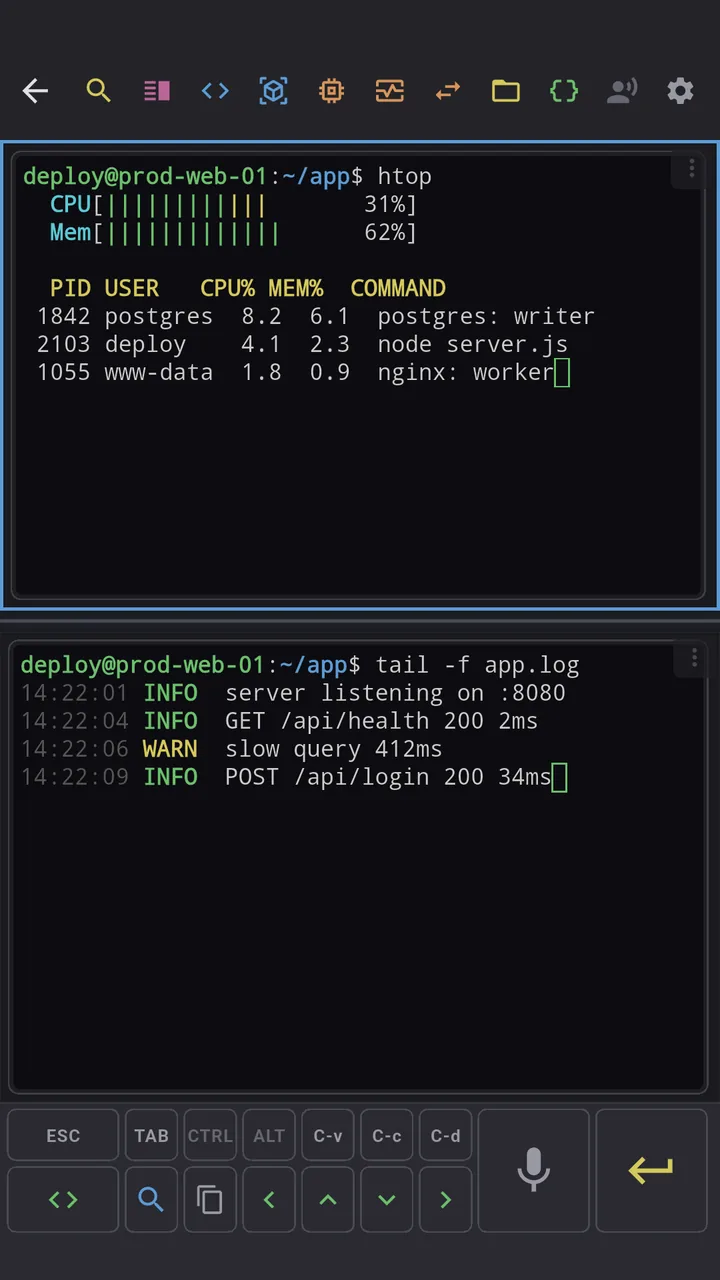
A toolbar you design. ConnectBot gives you a fixed set of Ctrl, Esc and Tab buttons. Dagon lets you build your own: keys, combos, snippets, arranged by drag and drop, with several named layouts you can swipe between.
Keys generated on the phone. Ed25519 in one tap, exported as a public key you paste into authorized_keys, plus import of existing OpenSSH and PEM keys, per-connection key selection and a biometric lock per connection.
Jump hosts, tags, config import. ProxyJump in the connection form, tags to filter a long list, and a paste-your-~/.ssh/config importer.
Then there is Premium, which is where Dagon stops being a straight ConnectBot swap and turns into something else:
- SFTP with preview, in-place editing and batch operations.
- Git, Docker, PM2 as real screens, not commands you type.
- Monitoring of CPU, RAM, disk, network and GPU, with scheduled health checks that push a notification when a server misbehaves.
- Voice input, because typing whole sentences to an LLM agent on a glass keyboard is miserable.
- An optional AI agent that proposes commands over your live session and never runs one itself. Off until you open it, blind until you switch "Attach terminal" on.
Premium is $2.99 a month or $29.99 a year, with 60 days free for every new account and no card. The terminal stays free with no time limit.
Moving over
ConnectBot has no export, but there is not much to move: hosts and keys.
- Hosts: if you keep a
~/.ssh/configanywhere, paste it into Dagon's "Import from SSH config". Otherwise add them once and export a Dagon backup (Settings, Other, Export) so the next phone is a one-tap restore. - Keys: ConnectBot does not export private keys, so generate a new Ed25519 key in Dagon (Settings, SSH keys) and add its public key to
authorized_keysnext to the old one. If you imported a key file into ConnectBot, import the same file into Dagon. Keys never leave the phone; sync carries labels and layout, not secrets.
Where to get it
Coming from JuiceSSH rather than ConnectBot? There is a separate post with the JuiceSSH-specific mapping.