Termius alternative for Android in 2026
termiusmigrationssh-clientandroid
Termius is the SSH client I keep recommending to people who work across a laptop and a phone. It is genuinely well built, with a clean terminal, real SFTP, port forwarding, snippets, Mosh, plus encrypted sync that puts your hosts and keys on every device you sign into. The team features are serious. None of this is a takedown. If you live in Termius on three platforms, most of what follows does not apply to you.
This post is for a narrower case. You SSH mostly from your phone, you do not need a desktop client, and you have been looking at the Pro subscription wondering if there is a cheaper way to get the same job done plus a few things Termius does not do. Here is how Dagon lines up.
When Termius is the right call
- You work across desktop and phone. Termius runs on every desktop OS, on iOS and in the browser, and syncs hosts, keys, snippets across all of them. Dagon is Android only. If half your sessions start on a laptop, Termius is the better shape.
- You want one encrypted vault, synced. Termius keeps hosts and keys in an encrypted cloud vault and shares them across devices. Dagon keeps keys in the Android Keystore and never uploads them; sync carries labels and layout, not secrets.
- You need Telnet. Termius has it. Dagon is SSH only.
- You want a team plan. Shared hosts, roles, an admin console. Dagon is a single-user app.
- You want polished autocomplete and AI suggestions. Termius has put real work into terminal autocomplete and AI command suggestions in Pro. Dagon has an agent too, but it is a different idea, more on that below.
If any of those is non-negotiable, Termius is a fine answer and this post is not trying to talk you out of it.
Where Dagon goes a different way
Dagon is built around one assumption: the phone is where you do most of this, and the things you reach for after the terminal are not more terminal, they are the rest of your ops. So the free tier covers the SSH basics, and Premium is less of a Termius clone and more of a pocket operations console.
Price. Dagon Premium is $2.99 a month or $29.99 a year, with 60 days free for every new account and no card. Termius Pro is a noticeably bigger subscription, roughly a hundred dollars a year, more if you pay monthly. If you only need it on Android, that gap adds up.
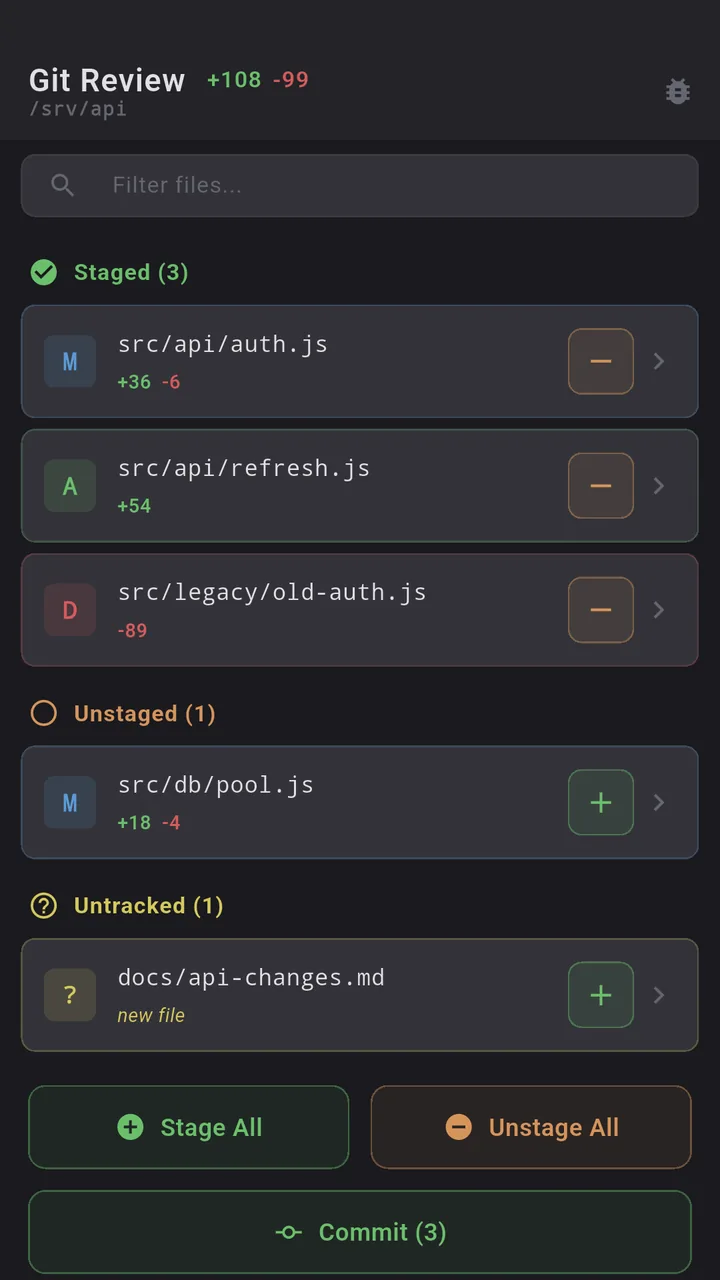
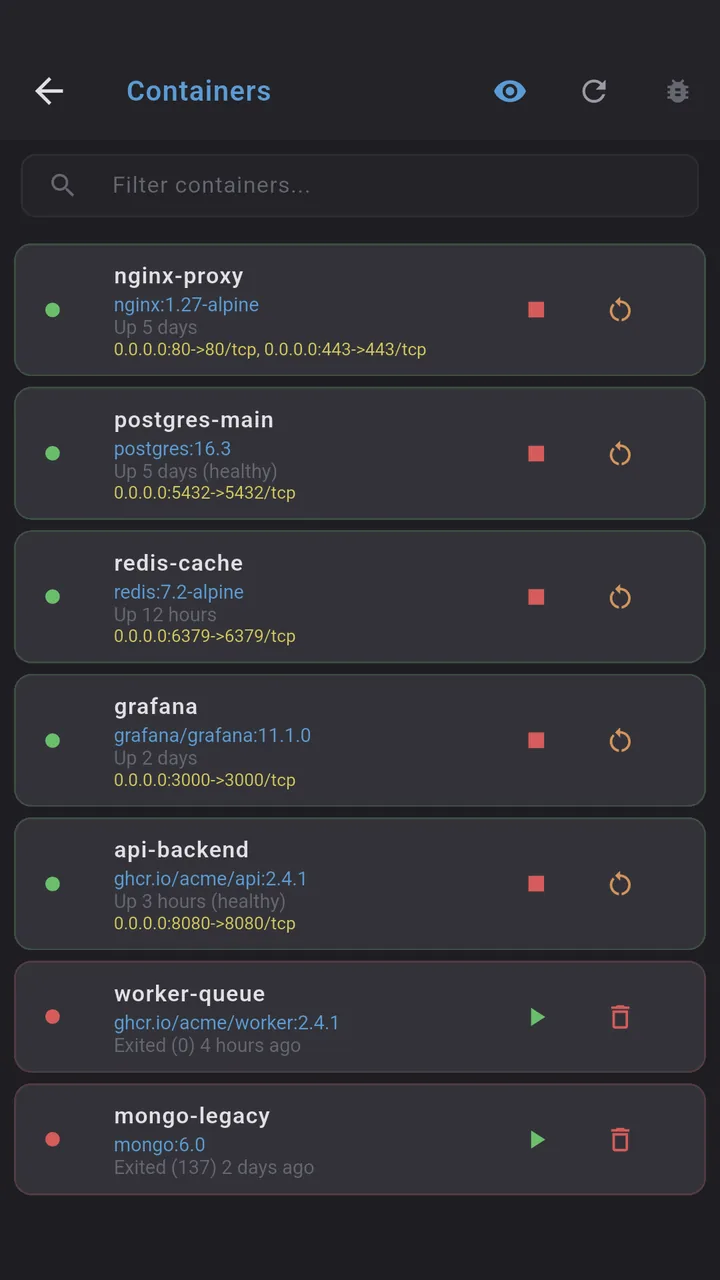
Git, Docker, PM2 as screens, not commands. This is the big one. Dagon has a real Git screen (diff, log, blame, branches, stash, conflicts, PR review for GitHub and GitLab), a Docker screen (containers, logs, stats, images, volumes, networks) and PM2. Termius gives you a terminal and trusts you to type. If you spend half your phone time in git log and docker logs, Dagon is built for that and Termius is not.
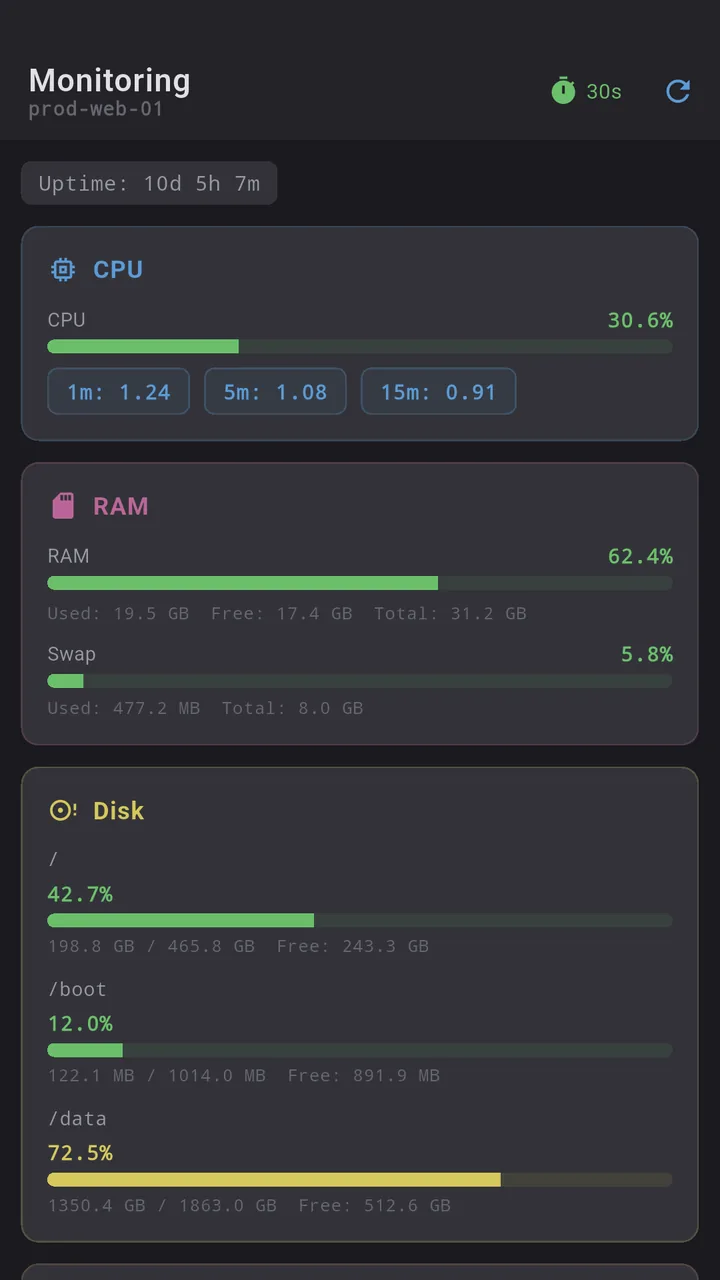
Monitoring and health checks. CPU, RAM, disk, network, GPU on a dashboard, plus scheduled health checks that push a notification when a server stops answering. Termius has nothing like this.
Voice input. Hold the mic, say the sentence, it lands in the terminal. This exists because I type most of my agent prompts from a phone, and a glass keyboard is the wrong tool for a long command. Termius does not do voice.
tmux that survives Android. Termius has Mosh, which helps with lag. But Android still kills background apps, and a Mosh session does not come back from a hard kill the way a tmux session does. Dagon runs a foreground service while a session is open and re-attaches to tmux on reconnect, so a build you started on the train is still there when you look again.
A toolbar you design. Keys, combos, snippets, arranged by drag and drop, with several named layouts you swipe between. Termius has a fixed key bar.
What Termius has that Dagon does not
- Cross-platform. No desktop, no iOS, no web client. If you need any of those, Dagon is not your tool.
- Encrypted cloud sync of hosts and keys. Dagon syncs labels and layout, not secrets, and keys stay on the phone.
- Telnet. SSH only here.
- Team features. Shared hosts, roles, audit. Dagon is single-user.
- Termius AI and autocomplete. Termius has invested there. Dagon's agent is a different shape: one button in the toolbar, off until you open it, blind until you switch "Attach terminal" on, and it never runs a command itself. It proposes, you tap, and risky ones get no button. If you want predictive terminal autocomplete, Termius is further along.
Moving from Termius
Termius does not export hosts and keys to a file you can paste elsewhere, because the whole point of its vault is that you do not handle them. So the move is a little more manual than the JuiceSSH or ConnectBot path:
- Hosts: if you keep a
~/.ssh/configon any machine, paste it into Dagon's "Import from SSH config" (Host, HostName, Port, User, IdentityFile and ProxyJump are mapped). Otherwise add the hosts you actually use by hand, once, then export a Dagon backup (Settings, Other, Export) so the next phone is a one-tap restore. - Keys: the clean path is a fresh Ed25519 key generated in Dagon (Settings, SSH keys), with its public key added to
authorized_keyson each server next to whatever Termius installed. If you still have the original private key file you put into Termius, import it instead (OpenSSH and PEM are accepted). Keys never leave the phone.
Where to get it
Dagon SSH is on Google Play. Terminal, snippets, keys and themes are free with no time limit; Premium adds Git, Docker, monitoring, SFTP, voice plus the AI agent, 60 days free for every new account, no card.
If something from your Termius workflow is missing, tell me. The health checks and the Docker screen both came from people describing what they were used to doing in a browser tab.