PM2 from Android: restart Node apps and read their logs from your phone
A Node API sits behind nginx, PM2 keeps it alive, and one evening it starts answering with 502s. You are on the sofa with a phone. What you want to know is short: is the process online, how often has it restarted in the last hour, and what did it print right before it died. Three answers. On a laptop each one is a single command.
The usual ways to check PM2 from a phone
You can SSH in and type. pm2 ls gives you the table, pm2 logs api --lines 100 gives you the tail, pm2 restart api fixes the easy cases. It all works, and it is the same PM2 you use from a laptop. The trouble is the phone itself. The pm2 ls table is wider than a portrait screen, so the columns wrap into a mess, and pm2 logs streams until you press Ctrl+C, which a phone keyboard does not have.
pm2 monit is the terminal dashboard that ships with PM2. On a laptop it is great. On a 6-inch screen its panels are squeezed into a few columns each, and you are back to pinching.
PM2 Plus at pm2.io is the official web dashboard. It is a paid monitoring service, it needs every server linked to it, and it shines when you run many processes across many machines. For "is my one API up" it is a lot of setup.
What the PM2 screen in Dagon does
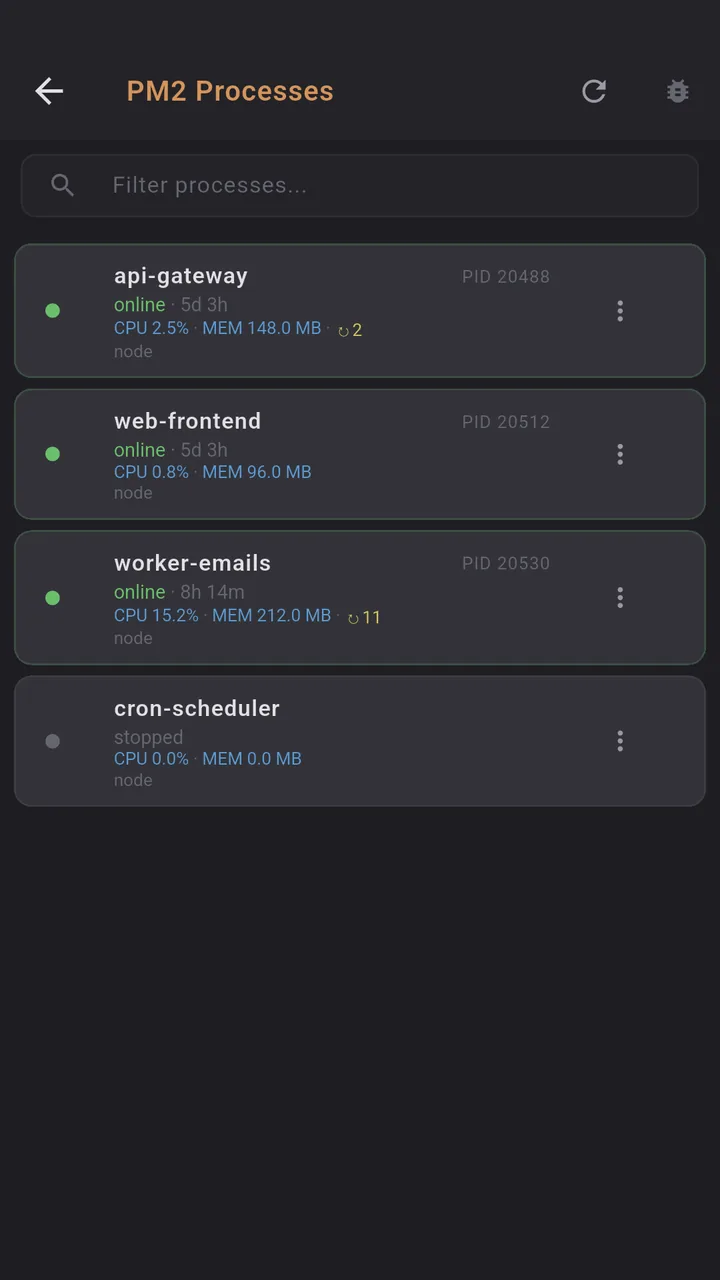
Dagon reads pm2 jlist over the SSH session you are already in and draws it as a list made for a phone. You open it from the terminal's top bar, under PM2, or by typing PM2 into the command palette.
Each process gets one card:
- a coloured dot for online, stopped, errored or launching
- the PID, with CPU and memory use
- uptime written like 2d 5h, and the restart count
- the interpreter, so you can tell node from bun or python at a glance
A filter box at the top narrows the list by name. The menu on each card has start, stop, restart, reload and delete. Delete asks first. Reload is the graceful one, the zero-downtime restart PM2 does for apps in cluster mode.
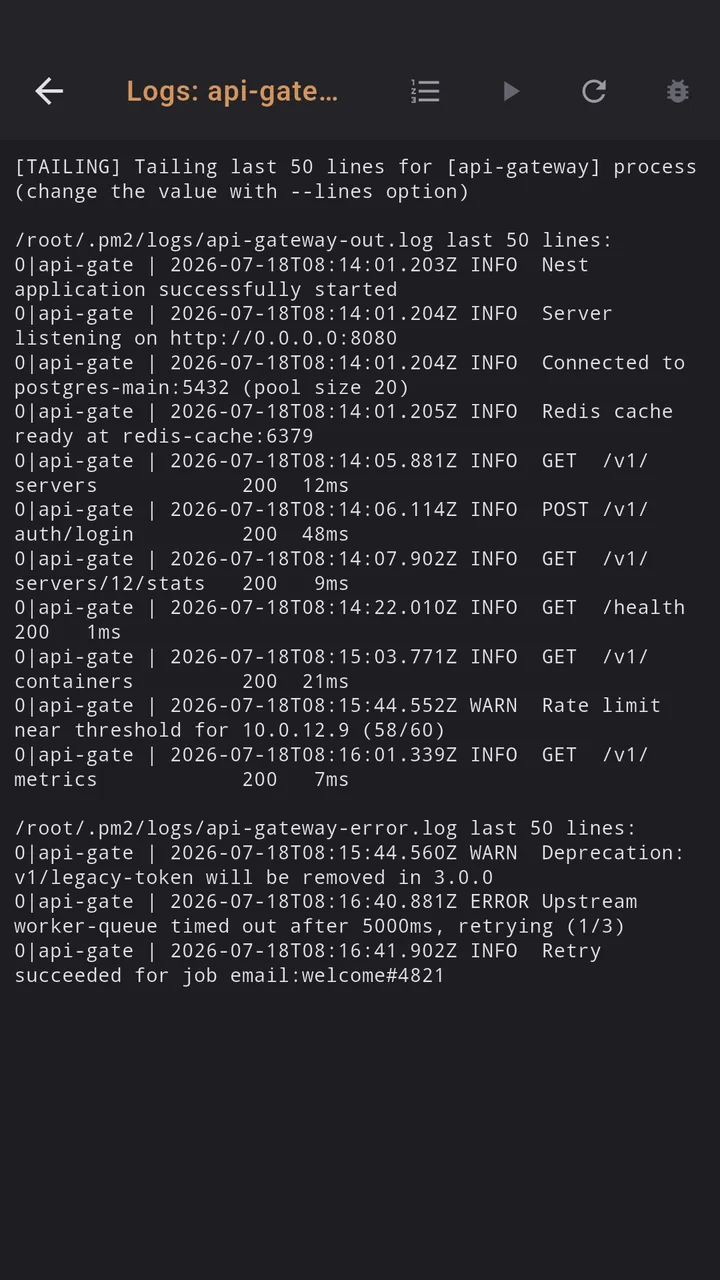
Tap a process and you land in its logs. You pick how far back to read, 50, 100, 200 or 500 lines, and you can turn on a refresh every three seconds to watch it come back up after a restart. No Ctrl+C needed, because nothing is streaming in your terminal.
One detail from the git history. When the PM2 daemon in memory is older than the installed PM2, pm2 jlist prints a version warning before the JSON. The first version of this screen tripped on that and showed an empty list. Since March 2026 Dagon skips those warning lines and reads the JSON after them.
Why over SSH
There is no agent to install and no port to open. Dagon runs the same pm2 commands you would type, as the user you logged in as, so it sees exactly the processes that user sees. If your apps run under a separate deploy user, connect as that user. The SSH key that gets you into the box is the only credential involved.
What it is not
- Not PM2 Plus. There is no history, no alerting on CPU spikes, no transaction tracing. Dagon shows the state right now. Dagon's health checks can notify you when a command's answer looks wrong, but that is a different feature.
- Not an ecosystem file editor. Changing
ecosystem.config.jsstill happens in the terminal, in vim or nano, or in the SFTP editor. - Not a way to run Node on your phone. It manages PM2 on the remote server you are connected to.
A phone session
The 502s again. Open Dagon and go to PM2 on that server. The API card shows a red dot and a restart count far higher than this morning. Tap it, read the last 100 lines, and there it is: the port is already in use, because someone started the app by hand next to PM2. Back in the terminal, find and stop the stray process, then restart the PM2 one from its card and watch the logs with the three-second refresh until the requests come through.
Where to get it
Dagon SSH is on Google Play. The terminal, 10 snippets, keys and themes are free with no time limit. The PM2 screen is part of Premium, along with Git, Docker, monitoring, port forwarding, SFTP transfers and voice, 60 days free for every new account, no card.
If you run PM2 and miss something on that screen, say which command you still end up typing.