Docker from Android: manage containers from your phone
An alert pings at 11pm, you are not near a laptop, and you need to know whether a container is restarting in a loop or just taking a long time to come up. From a phone you have two real options, and both of them work, which is why I am not going to pretend there is only one answer.
The first is to SSH in and type. docker logs --tail 100 -f <container>, docker stats, docker restart. It works. It is the same Docker you use from a laptop, and the only thing wrong with it is that typing docker logs --tail 100 -f on a glass keyboard, getting the container name right on the first try, and reading a log stream on a 6-inch screen is a lot of friction for something you only need to do for thirty seconds.
The second is Portainer. It is a genuinely good web UI for Docker, and if you already run it, opening it in a mobile browser will get you there. The cost is that it is a web app sized for a desktop, so you pinch and zoom your way through it, and it needs a port exposed somewhere, or a tunnel, or a Cloudflare Access in front of it. That is fine on a box you already run Portainer on, and overkill on one you do not.
Dagon's Docker screen is a third option, and it exists because I kept doing the first one at night and resenting it.
What the Docker screen actually does
It is a native Android UI over Docker, running on the server you are SSH'd into:
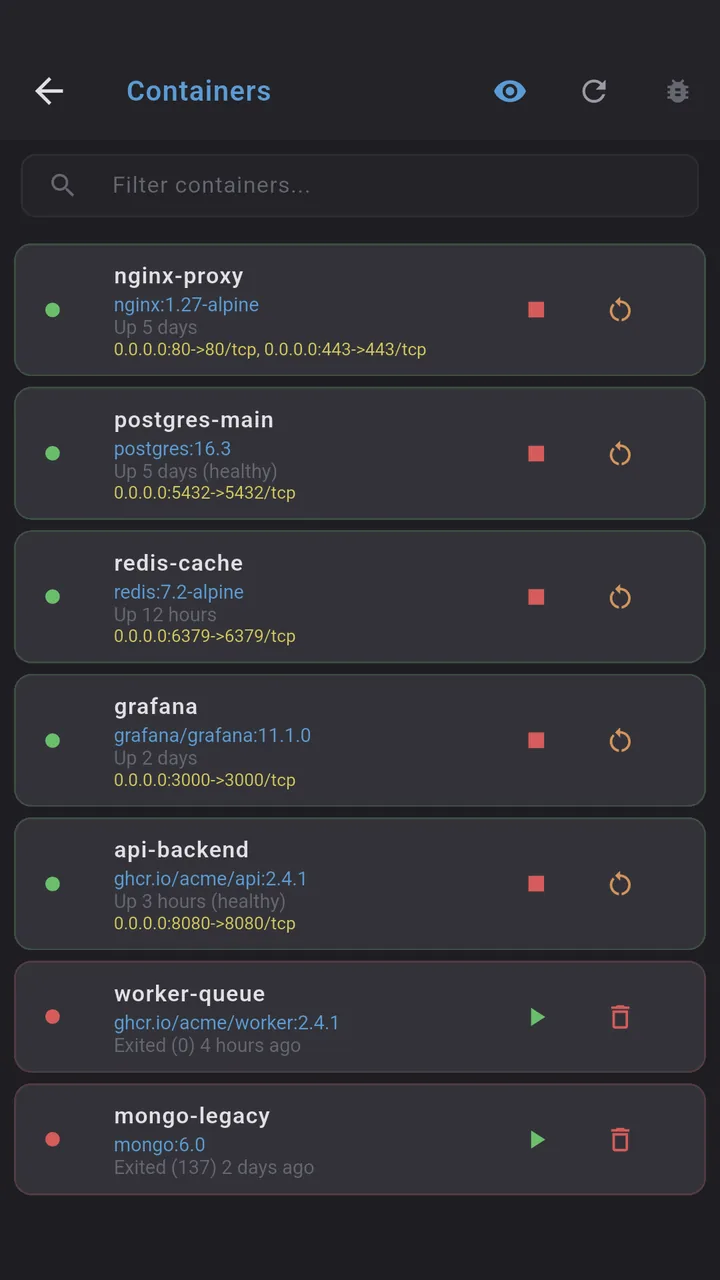
- Containers: list them, see status, and do the day-to-day ops, start, stop, restart, remove. The four things you do at 11pm.
- Logs: tail and follow a container's logs without typing the flags or remembering the name. This is the screen I open most.
- Stats: per-container CPU, memory, network traffic, live, the way
docker statsshows it but readable. - Images: see what is on the box, what is dangling, what is taking space.
- Volumes: inspect named volumes, the bit of Docker that is impossible to keep in your head.
- Networks: list and inspect networks, the other bit.
Why "over the SSH connection you already have" matters
Portainer is a separate process that needs its own port. Even if you put it behind a tunnel or Cloudflare Access, that is one more thing to secure, one more thing to keep updated, one more surface. If you only have one or two boxes, it is hard to justify, and if you have ten, it is hard to keep consistent.
Dagon runs Docker over the SSH session you opened to get in. No new port, no agent, no container to keep alive, no second auth. The same SSH key that got you into the box is the only credential involved, and nothing about Docker is exposed to the internet that was not already exposed by SSH.
What it is not
- Not a Portainer replacement. If you write Compose files in a UI, manage stacks, or run a Swarm, Portainer is still the better tool. Dagon is for the container ops you do from your phone, not the infrastructure you build from a desk.
- Not Docker Desktop. It does not run containers on your phone. It manages Docker on a remote server, the one you SSH'd into.
- Not a monitoring suite. Stats are live but not historical. For "what did this container's CPU do last week" you still want Prometheus or Grafana. Dagon's health checks will push you a notification when a server stops answering, but it is not a time-series database.
A phone session
Alert at night, open Dagon, tap the Docker screen on the box in question, find the container in the list, tap logs, see the restart loop in the last thirty lines, tap restart, watch it come up green, close the phone. Done in under a minute, no typing, no browser zoom, no new port to open.
Where to get it
Dagon SSH is on Google Play. The terminal, snippets, keys and themes are free with no time limit. The Docker screen is part of Premium, along with Git, PM2, monitoring, SFTP, voice and the optional AI agent, 60 days free for every new account, no card.
If the container operation you reach for at night is not in that list, tell me. The restart button exists because that was the one I kept typing wrong.