Monitor a Linux server from Android: CPU, RAM, disk and GPU over SSH
server-monitoringlinuxandroidssh-client
Something feels slow. The API answers late, a deploy hangs, or a training job on the GPU box has gone quiet. You are away from the desk, so the first look happens on a phone. Is the box busy? Or out of memory, or out of disk? That is usually all you need to know first.
There are honest ways to do that already.
The first is to SSH in and run htop, or free -h and df -h one after another. It is the real data, straight from the box. On a phone it is also a wall of columns that wraps badly, htop wants function keys your keyboard does not have, and you end up pinching the terminal font down until the numbers are unreadable.
The second is a proper monitoring stack, Netdata or Prometheus with Grafana in front of it. Those give you history and alerts, which a phone screen never will. They also need an agent on every server and a dashboard reachable from your phone, which means a port, a tunnel or a login page somewhere. Worth it for a fleet. A lot of setup for two VPSes and a home server.
Dagon's monitoring screen sits between those two: the htop answer, without typing and without zooming. It landed in the app in February 2026, and the GPU card followed about a week later.
What the screen shows
Open a server in Dagon, tap the monitoring icon in the top bar (or find it in the command palette), and you get one scrolling page of cards for that host:
- CPU: a usage bar with the load average next to it, and uptime above the card.
- RAM: how much is in use out of the total, plus swap if the box has any.
- Disk: a separate bar for every real filesystem, so
/datafilling up is not hidden behind a healthy/. - Network: received and sent bytes per interface, and the speed between two refreshes.
- Top processes: the ten hungriest by CPU, with PID, CPU%, memory% and the command.
Bars are green under 70%, yellow up to 85% and red above that. On a small screen you read the colour first. The number matters only when something is not green.
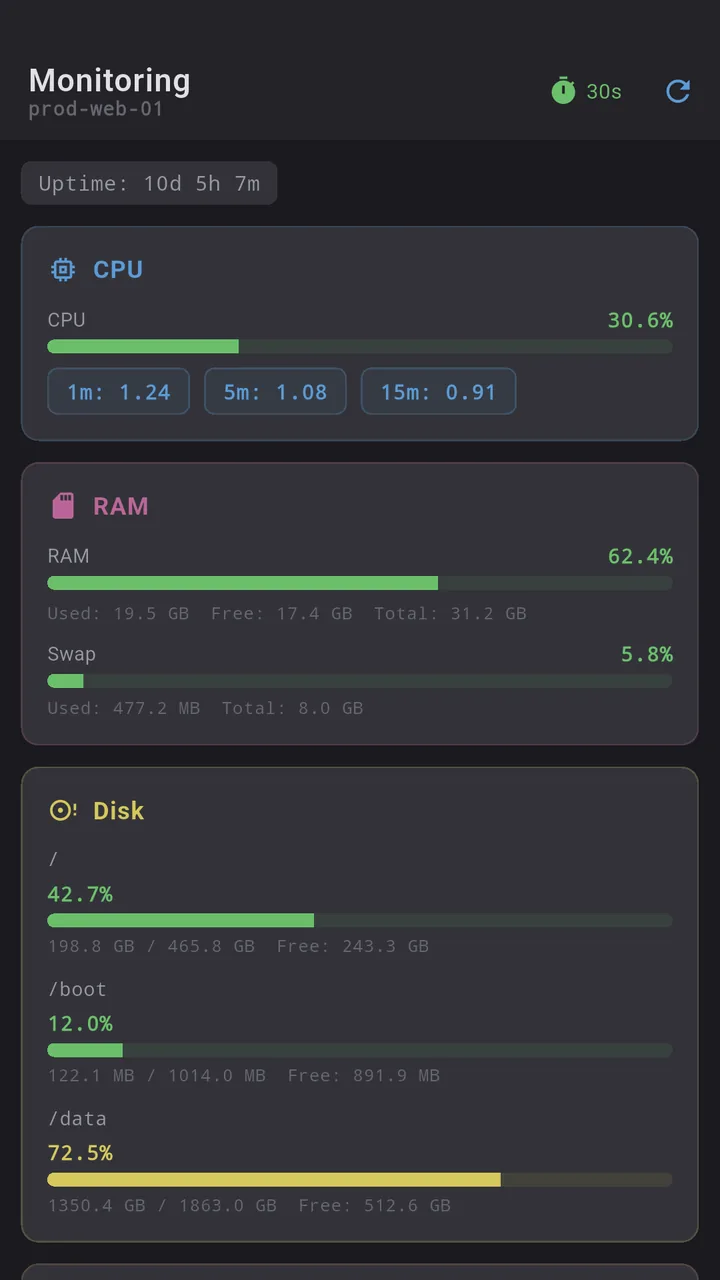
The screen refreshes every 30 seconds by default. The timer in the top bar switches it to 5 or 10 seconds when you are watching something happen, or turns it off, and the refresh button next to it polls right away. CPU usage and network speed are computed from the difference between two polls, so they show up from the second refresh on.
GPU servers
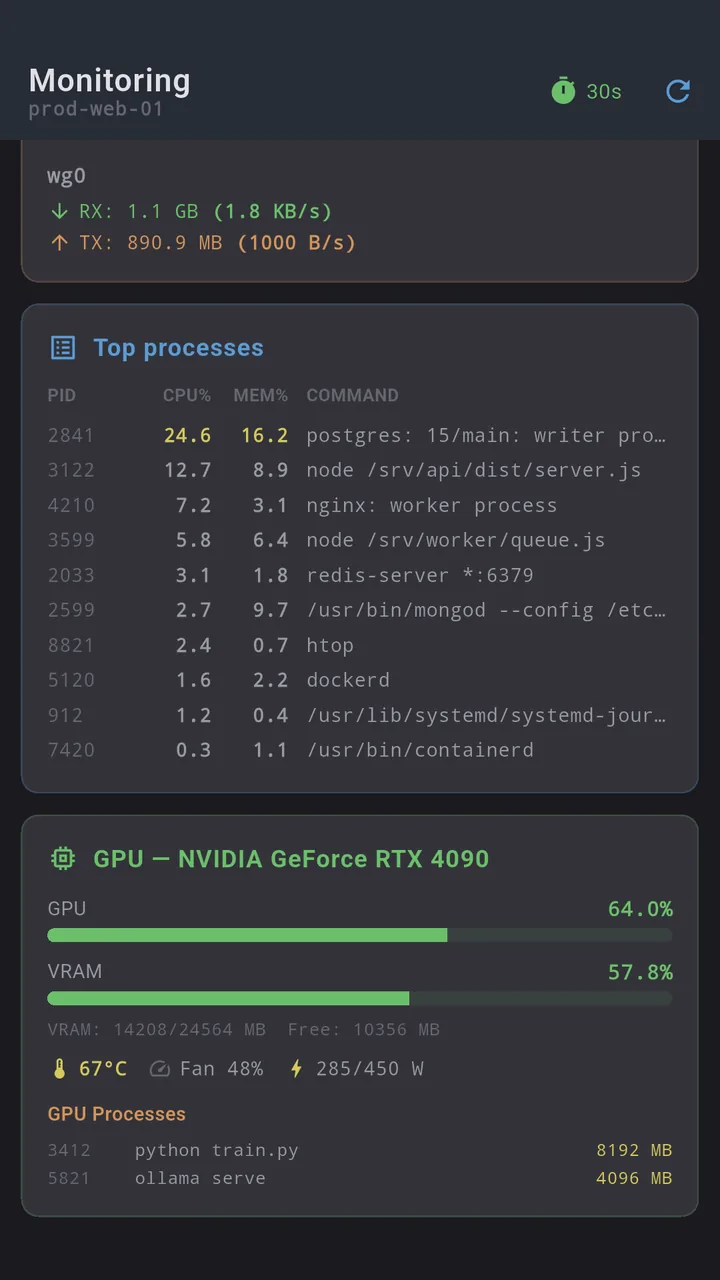
If the server has nvidia-smi or rocm-smi, Dagon finds it on the first poll and adds a card per GPU, with no setting to switch on. It shows utilisation and VRAM as bars, temperature, fan speed and power draw against the limit, and a table of the processes holding GPU memory. When a model run is slow, that table tells you in one glance whether something else grabbed the card.
Nothing to install on the server
Each refresh is one SSH command. That's it. It reads /proc for uptime, load, memory, CPU counters and network, runs df and ps, and Dagon parses the output on the phone. No agent, no exporter, no open port, and the only credential involved is the SSH key you already connect with. If a box is reachable over SSH, it can be monitored, including through a jump host.
What it is not
- Not history. It shows the state now and the speed since the last poll. For "what did memory do overnight" you still want Netdata or Grafana.
- Not alerting on its own. For that there is a separate health check in the connection settings: a command that Dagon runs every few minutes (15 by default) over a short SSH exec, with a notification when it exits non-zero, matches a pattern you set, or cannot connect. It runs while the app is alive, so it is a phone-side check rather than a server-side monitor.
- Linux only. It reads
/proc, so a BSD or macOS host will not fill the cards.
A phone session
The API is slow. You open the server in Dagon and tap monitoring. CPU is green, RAM is yellow, and the top processes show a queue worker sitting on most of the memory. Back to the terminal, restart the worker, return to monitoring and set the timer to 5 seconds to watch RAM come down. No free -h, no htop columns wrapping across the screen.
Where to get it
Dagon SSH is on Google Play. The terminal and snippets are free with no time limit, keys and themes too. Monitoring with the GPU card is part of Premium, along with Git, Docker, PM2, port forwarding, SFTP transfers and voice, 60 days free for every new account, no card.
If there is one number you check on your servers that the screen does not show, tell me which.