SSH port forwarding on Android: reach a database or dashboard through your phone
port-forwardingssh-tunnelandroidssh-client
The things I most often need to look at on a server are the ones I deliberately hid. Postgres listens on localhost. Grafana is bound to the internal network. The admin panel of some self-hosted app has no business being on the public internet, so it is not. That is correct, and it is also annoying the moment you are away from the laptop and want to check one query or one graph.
SSH port forwarding is the old, boring answer. You already have an SSH login to the box. The tunnel carries the traffic for one port inside that connection, and nothing new gets exposed.
Local and remote, in plain words
There are two directions, and the names confuse everyone the first time.
Local forwarding (-L) opens a port on your side and sends whatever connects to it through SSH to a host and port the server can reach. On a laptop it looks like this:
`` ssh -L 5432:localhost:5432 deploy@prod-web-01 ``
Now localhost:5432 on the laptop is really Postgres on the server. The target does not have to be the server itself. -L 5432:db.internal:5432 reaches a database machine that only the server can see.
Remote forwarding (-R) is the reverse. The server opens a port, and connections to it come back through SSH to something on your side. You need it far less often. It is for the cases where the server has to reach a service that lives on your device.
If you only remember one: -L is "I want to reach something behind the server". That covers almost everything people mean by an SSH tunnel.
Why it is awkward on a phone
On a laptop the tunnel is one flag on a command you type once. On a phone you can still run ssh -L in a terminal app, but then the tunnel is tied to a shell you cannot see from anywhere else, and you type host:port pairs on a glass keyboard.
And phones drop connections all the time. You want to see which tunnels are up, how many connections go through each, and restart one with a tap, not hunt for which shell started what. So the good Android SSH clients give tunnels a screen of their own.
How it works in Dagon SSH
In a terminal session, the orange arrows icon in the top bar opens Port Forwarding for that connection. The screen lists your rules, and each one shows its state: active, starting, stopped, or the error that stopped it. Active rules also show how many connections are going through them right now.
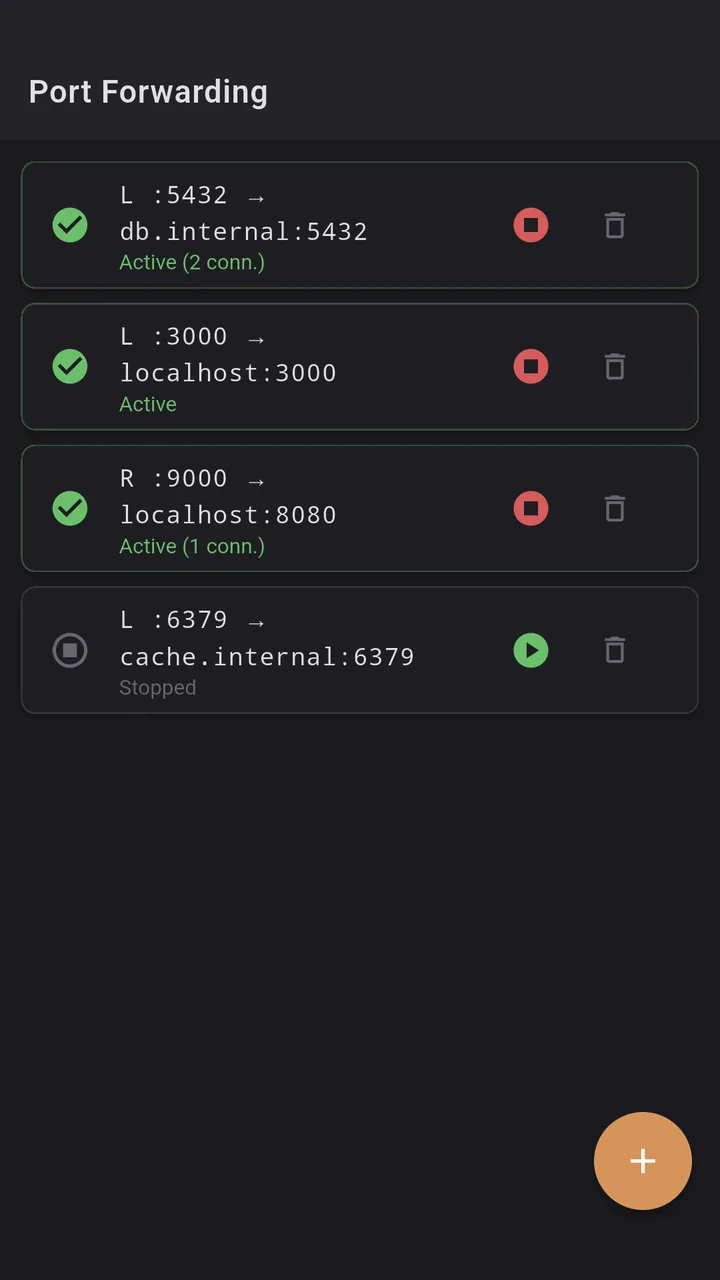
The plus button adds a rule. You pick Local (-L) or Remote (-R), then fill in three fields: local port, remote host, remote port. There are quick chips for the usual suspects (PostgreSQL 5432, MySQL 3306, Redis 6379, MongoDB 27017 and HTTP 8080), and typing the remote port fills the local one with the same number, since that is what you want most of the time. The dialog checks that ports are between 1 and 65535 and that you are not reusing a local port another rule already holds. "Add and start" saves and opens the tunnel straight away.
A local rule makes the phone listen on that port, so any app on the phone can use it. Point a database client at localhost:5432, or open http://localhost:3000 in the browser, and you are talking to the service behind the server. Every rule has a play/stop toggle and a delete button.
The tunnel runs over the same connection settings as the session, so if that server is behind a jump host, the forward goes through the jump host too. You do not configure the route twice.
Things worth knowing before you rely on it
- Pick a local port above 1024. Android does not let normal apps listen on low ports, so forwarding to local port 80 will fail. Use 8080 and point the browser there.
- The local port is open to your network, not just to the phone. The listener binds to all interfaces, so on a shared Wi-Fi someone else could reach your tunnel if they knew the port. On hotel or café networks, stop the rule when you are done.
- Remote forwarding on the server listens on loopback unless sshd allows otherwise. With OpenSSH's default
GatewayPorts no, the port opened by-Ris only reachable from the server itself. That is usually what you want.
What it is not
- Not persistent. Rules live as long as the SSH session. Close the session and you add them again next time. I would rather type three numbers than find a tunnel I forgot about still open a week later, but if you wanted saved tunnels per host, this is not that yet.
- Not a SOCKS proxy. There is no dynamic forwarding (
-D), so you cannot route a whole browser through the server. One rule is one port. - Not a VPN. If you need half the internal network all the time, WireGuard or Tailscale is the better tool. Tunnels are for the one service you need for ten minutes.
A phone session
Someone says the app is slow and you are nowhere near a laptop. You open the session to the web server, tap the arrows, pick the PostgreSQL chip, type db.internal as the host and start the rule. A database client on the phone connects to localhost:5432, you run the query that lists the slowest statements and see which one is hurting. Stop the rule, delete it. The database never saw the internet, and no firewall port was opened to get there.
Where to get it
Dagon SSH is on Google Play. Every new account gets 60 days of everything, no card.
Port forwarding is part of Premium after that, together with the Git, Docker and monitoring screens. The terminal itself and a read-only file browser stay free.
If you use tunnels from your phone for something I did not think of, tell me what it is.